From Detection to Resolution - Automated Remediation with UXM and ServiceNow ITOM
Modern IT teams cannot afford to wait for users to report problems.
With UXM’s real-time endpoint telemetry and Digital Employee Experience analytics, organizations can move from reactive support to fully automated remediation workflows.
A great example is low disk space on employee endpoints.
Instead of waiting for Windows updates to fail or applications to crash, UXM detects the issue early, automatically opens an incident in ServiceNow, triggers remediation, and closes the incident automatically when the endpoint returns to a healthy state.
🚀 Want to build self-healing endpoint operations?
Explore how UXM integrates with ServiceNow ITOM to automate remediation workflows.
The Automation Workflow
The workflow is simple but extremely powerful:
- UXM continuously analyzes endpoint health
- Detects that free disk space is below threshold
- Automatically creates an incident in ServiceNow
- ServiceNow ITOM triggers cleanup automation
- UXM validates the endpoint is healthy again
- Incident is automatically resolved and closed
This creates a true closed-loop remediation process.
How UXM Detects the Problem
UXM’s lightweight endpoint agent continuously streams:
- Disk usage
- Temp folder growth
- User profile cache size
- Application log growth
- Update storage consumption
- OS health metrics
- Endpoint performance indicators
Using built-in analytics, UXM can identify:
- Sudden disk consumption spikes
- Slow long-term disk degradation
- Known cleanup candidates
- Devices at risk of failed Windows upgrades
- Devices approaching critical operational thresholds
For example:
Endpoint
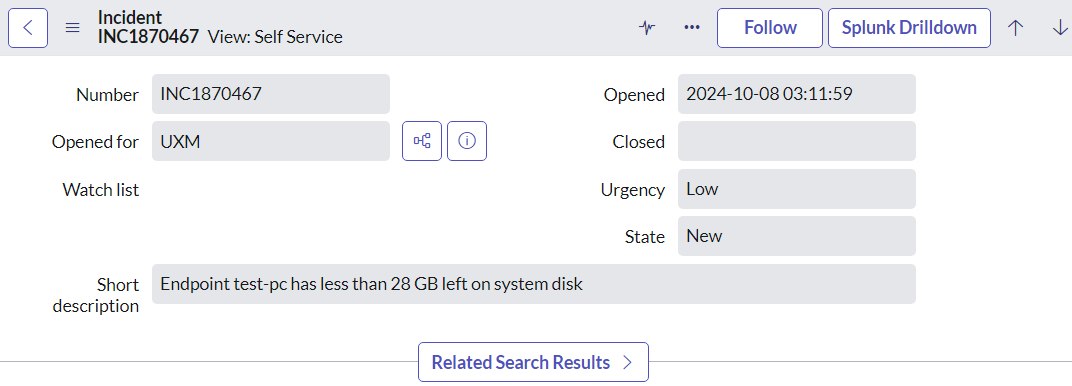
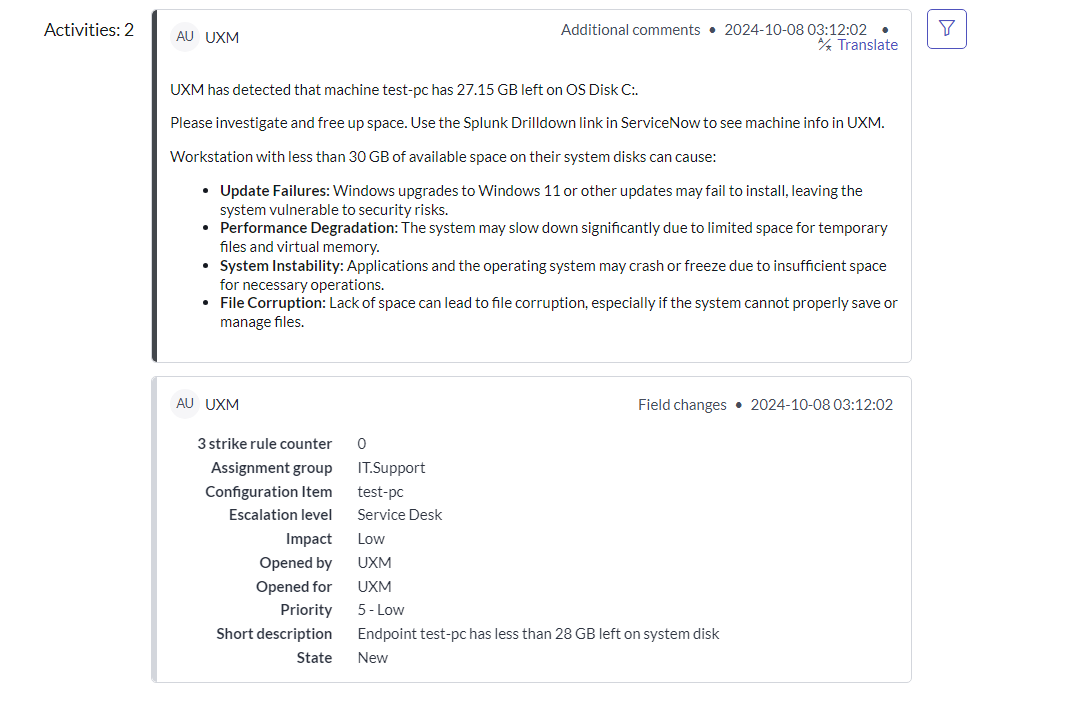
TEST-PCdrops below 28 GB free space on the OS disk.
UXM immediately classifies this as a service-impacting endpoint risk.
This proactive endpoint visibility is one of the key strengths of the UXM platform.
Automatic Incident Creation in ServiceNow
Once the threshold is breached, UXM can automatically send the event into ServiceNow ITOM / ITSM as an incident.
Typical payload includes:
- Hostname
- Affected user
- Device location
- Disk volume
- Free space remaining
- Historical trend
- Recommended remediation
- Deep link back to UXM endpoint dashboard
- Correlation ID for deduplication
Example incident:
Incident: Low Disk Space on Endpoint
- CI: TEST-PC
- Impact: Medium
- Urgency: Medium
- Assignment Group: EUC Operations
- Category: Endpoint Health
- Subcategory: Disk Space
- Source: UXM Event
UXM supports correlation IDs so duplicate alerts update the same incident instead of flooding support teams.
UXM can also route
Smart Assignment Group Routing with UXM Endpoint Metadata
Beyond incident creation and remediation, UXM can intelligently route tickets to the correct ServiceNow assignment group using endpoint metadata.
Because UXM continuously enriches endpoint telemetry with directory and device context, incidents can include attributes such as:
- Country from Active Directory registration
- Region / office location
- Business unit
- Device ownership type
- Department
- Support tier
- Endpoint management platform
- VIP user status
For example, if an endpoint is registered in Active Directory under Denmark, UXM can automatically ensure the incident is routed to the Nordics EUC support queue instead of a global service desk.
ServiceNow ITOM Automates Cleanup
This is where ServiceNow IT Operations Management (ITOM) adds major value.
Once the incident is created, UXM and ServiceNow can automatically trigger remediation actions such as:
- Clear Windows temp folders
- Remove browser cache
- Delete Teams / Zoom cache
- Empty recycle bin
- Remove stale log files
- Cleanup old Windows update files
- Run Intune PowerShell cleanup scripts
- Launch endpoint automation via Power Automate
- Trigger third-party remediation tools
This can happen:
- Immediately
- After approval
- During maintenance windows
- Based on device criticality
- Based on user region or assignment group
ServiceNow ITOM’s workflow engine makes this highly scalable across thousands of endpoints.
In environments without ServiceNow ITOM, UXM can still detect issues such as low disk space, degraded performance, or cache buildup, and then initiate remediation workflows through Intune or Configuration Manager—such as running PowerShell scripts, clearing temporary files, or enforcing configuration fixes.
This ensures organizations can still achieve closed-loop remediation even without a dedicated ITOM layer, using Microsoft’s endpoint management stack as the execution engine.
UXM Verifies Remediation Success
The most important part of automation is validation.
After cleanup runs, UXM continues monitoring the endpoint in real time.
Example validation logic:
- Free disk space rises above 30 GB
- CPU normalizes
- Windows update services recover
- Log write failures disappear
- Device performance returns to baseline
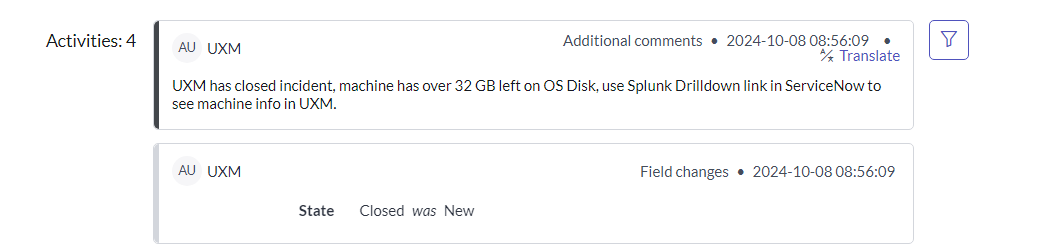
Once UXM confirms the issue is resolved, it can send a resolution signal back to ServiceNow.
Auto-Close the Incident When Fixed
This enables true automatic incident closure.
ServiceNow updates the incident state to:
- Resolved or Closed
- Resolution Code: Automated Remediation
- Resolution Notes: UXM verified disk recovery after automated cleanup
This avoids manual ticket handling for repetitive endpoint issues.
The support team only gets involved if:
- Cleanup fails
- Space drops again quickly
- Endpoint is offline
- Root cause requires human action
- Repeated incidents suggest deeper storage issues
This dramatically reduces ticket noise and MTTR.
Why This Matters for IT Operations
This UXM + ServiceNow ITOM workflow helps IT teams achieve:
Faster Resolution
Automated cleanup reduces response time from hours to minutes.
Lower Ticket Volume
Common endpoint issues never require manual intervention.
Better Employee Experience
Users never experience failed updates or degraded performance.
Smarter Operations
UXM analytics identifies recurring patterns and root causes across device fleets.
Preventive IT
Problems are resolved before they become service desk calls.
This allows IT to remediate before the employee notices a problem.
Beyond Low Disk Space
The same remediation model works for many endpoint issues:
- High CPU from runaway processes
- Memory leaks
- VPN instability
- Wi-Fi degradation
- Teams/Zoom cache corruption
- VDI login failures
- Failed Windows services
- Endpoint certificate issues
- Application crash loops
- Browser performance problems
UXM provides the telemetry, analytics, and trigger logic needed to automate all of these workflows.
Build Self-Healing Digital Workplaces with UXM
UXM turns endpoint data into automated action.
By combining:
- Real-time endpoint observability
- Smart analytics
- ServiceNow ITOM workflows
- Automated remediation
- Automatic incident closure
IT teams can create self-healing digital workplaces that scale efficiently.
The result is fewer tickets, faster recovery, and a dramatically better employee experience.
Ready to modernize endpoint operations with automation?