Lookup endpoint warranty information
Warranty API Integration
Currently, Lenovo is the only vendor that exposes an API for automatic warranty lookup.
Lenovo
-
A Client API Key is required
- Request it from your Lenovo Sales/Partner Manager
-
Add the API key:
- Go to Administration → Configure UXM → Endpoint Warranty
- Or send it to support@uxmapp.com
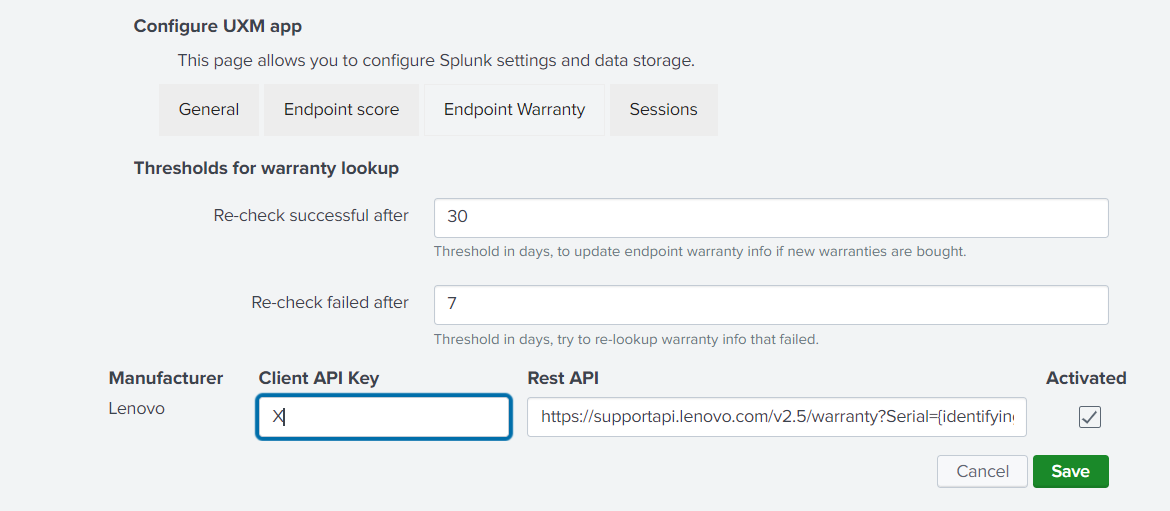
Automated Warranty Script
A scheduled script update_warranty.py runs every night and will:
- Look up warranty information for new devices
- Retry failed warranty lookups every 7 days
- Re-check warranty on older devices every 30 days to detect newly purchased warranties
Note:
Lenovo may return multiple warranties per device. The script uses the warranty with the latest expiry date.
Dell
-
Register on the Dell TechDirect platform:
-
Complete API enrollment:
- https://techdirect.dell.com/Portal/APIs.aspx
- This is a manual approval process and may take 1–2 days
-
Request an API key for warranty information after enrollment
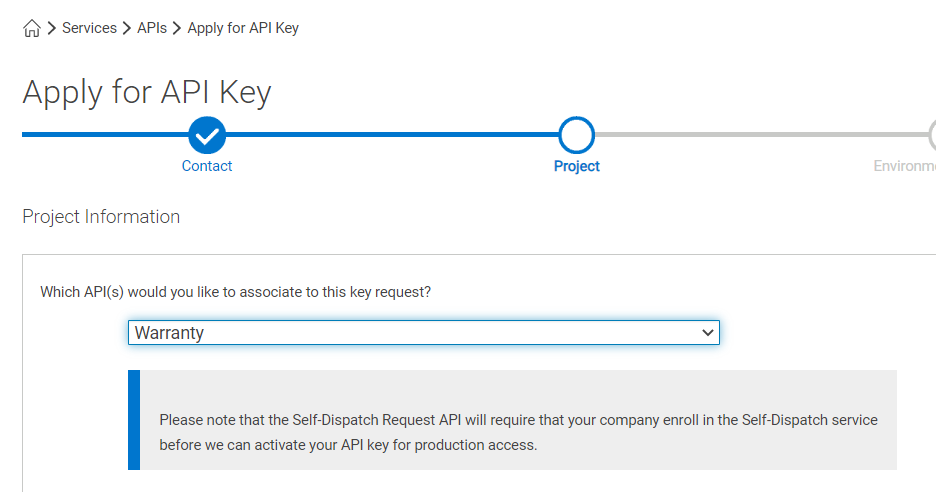
-
During the request, provide:
- Estimated API call volume per day (based on number of Dell devices monitored in UXM)
- API usage: Internal company use
-
Submit the request and wait for approval (up to 5 business days)
-
After approval:
- Add the API key under Administration → Configure UXM → Endpoint Warranty
- Or send it to support@uxmapp.com
Dashboards
Warranty data can be analyzed in:
- Endpoints → Endpoint Dashboard
- Reports → Endpoint Reports → Endpoints - Warranty - Lenovo
Troubleshooting
Check logs using:
index="_internal" source="*_update_warranty_script.log*"